
Plugin

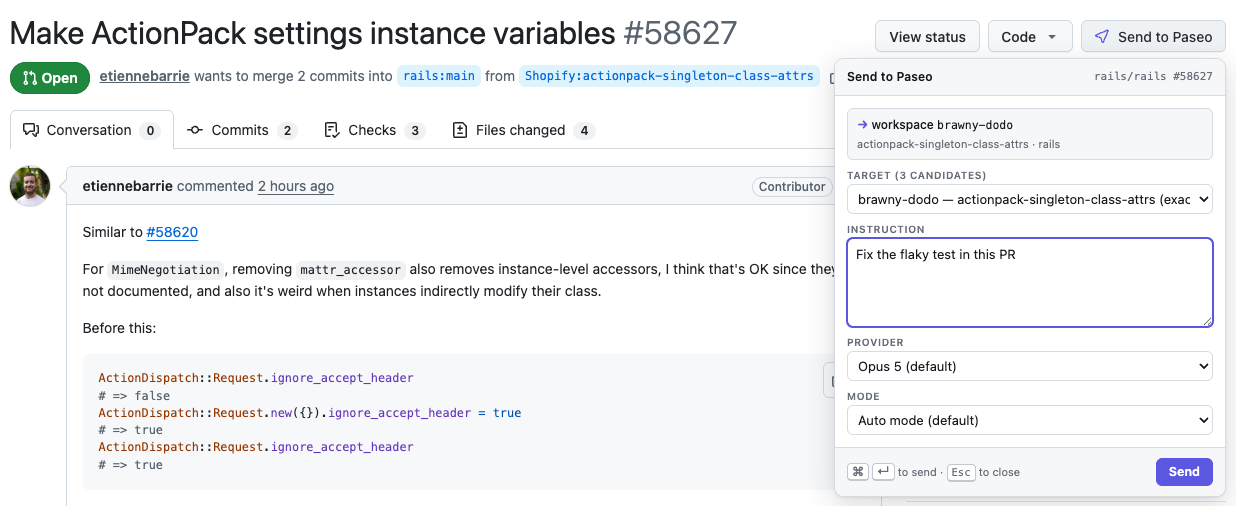
Send to Paseo lets a companion browser extension send a pull request, with an instruction, to a Paseo workspace and agent, creating a worktree checked out to the pull request when no workspace fits. It requires Paseo 0.9.0 or later and does nothing without the browser extension, which is a separate install.
Setup
The browser extension must be present. Open the Send to Paseo sidebar screen, copy the pairing token and paste it into the extension's options. Regenerating the token unpairs any extension that has the old one. The daemon host needs git, and the GitHub CLI (gh) is optional: without it you can still pick a workspace and send, but pull request titles and branch names are missing and the default becomes creating a worktree.
What it does and what it can reach
The plugin runs an HTTP bridge on 127.0.0.1 (default port 7788, configurable), and the extension talks only to that bridge. Every request except a health check needs the pairing token, requests from web page origins are refused, and only loopback hosts or your configured private address are accepted.
A send starts a new agent in the workspace, or messages an existing one, depending on the destination setting. That agent can run code on the daemon host with the permission mode you chose, either per send or as the plugin's default, so pair only extensions you trust. Settings also cover the default model and an optional Paseo profile to follow. The pairing token and, for additional machines, connection codes and tokens are stored in the plugin's settings file under $PASEO_HOME/plugin-data/send-to-paseo/ with owner-only permissions. If the daemon requires a password, the plugin reads it from its environment, a daemon password file or that settings file, and does not log it. gh reads pull request metadata using the GitHub account it is signed in to.
Private address and several machines
One bridge, beside the browser, can forward to other Paseo machines. Each additional machine shares a connection code containing its private bridge URL and token, so treat the code as a secret. The forwarding bridge reaches it over authenticated HTTPS. The private address must be an HTTPS origin, for example from a reverse proxy, and the Enable private access button runs tailscale serve --bg <port>, which publishes the loopback bridge on your tailnet. Use Tailscale Serve and not Funnel, since Funnel is public.
This plugin entry was imported from paseo.cafe.