
Clisbot vs Orca
Orca is an MIT-licensed desktop app for running terminal coding agents in parallel Git worktrees. It includes a mobile companion app, SSH worktrees, remote Orca servers, an embedded browser, and a CLI.
Clisbot is an app for orchestrating coding agents, with native clients on desktop, mobile, web, and the CLI. Open source (Apache-2.0).
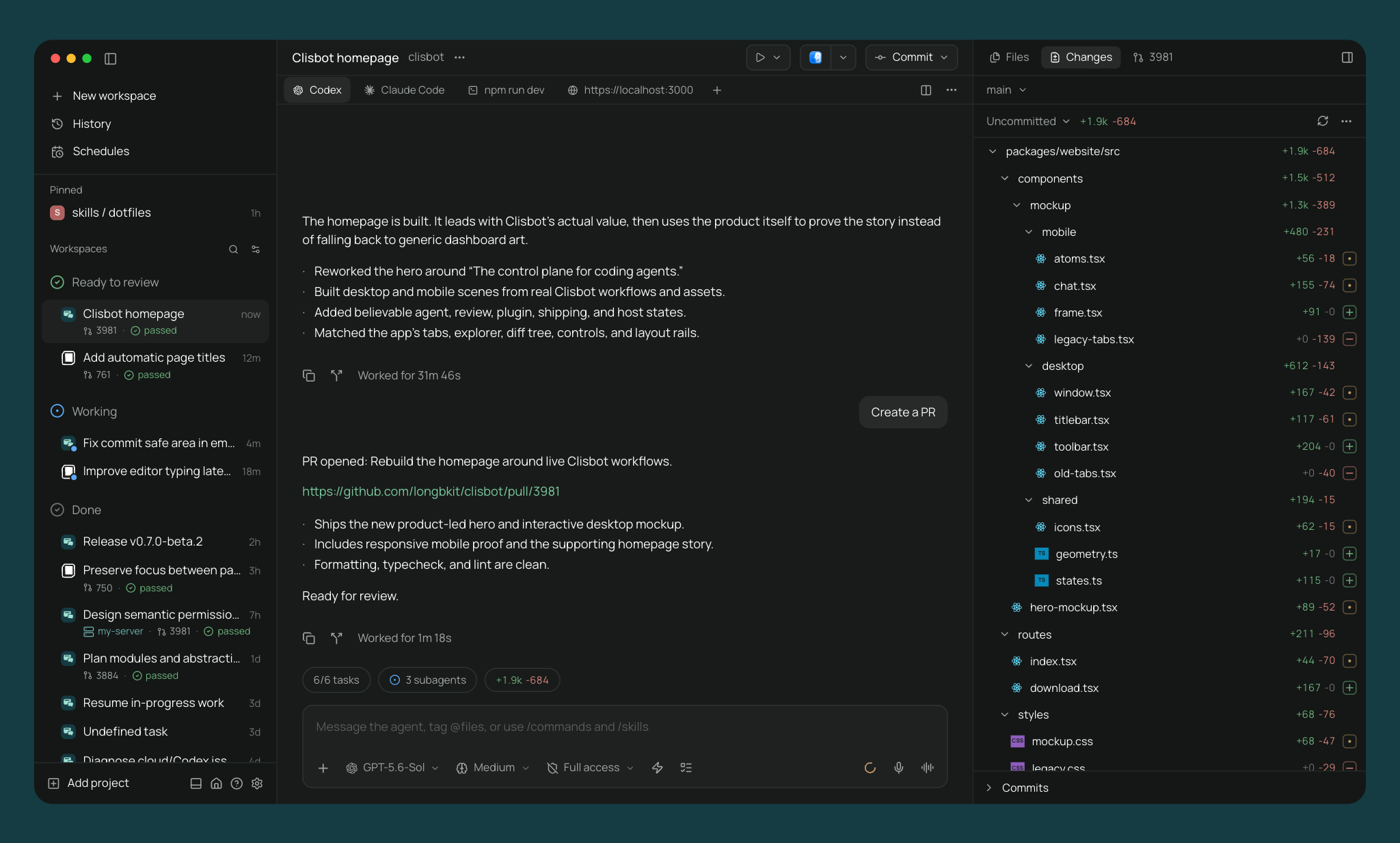
The main difference
Orca is built around terminals. Each agent runs in a terminal pane, and an experimental Chat UI can show supported agents as a chat transcript. Orca ships a broad set of built-in tools around those terminals.
Clisbot is built around agent chat. It keeps a small core for starting agents, following their work, giving direction, and reviewing results, and adds everything else through plugins that run on the daemon and every client.
Orca is made by Stably AI, a venture-funded company (Y Combinator). Clisbot is independent and open source.
Architecture and remote machines
The Clisbot daemon runs as its own process. Desktop, web, mobile, and CLI clients connect to it directly, over SSH, or through the optional end-to-end encrypted relay. Run the daemon on your laptop, a VM, a home server, or in Docker, and connect to any of them from any client. See connectivity.
Orca runs inside its desktop app by default and reaches other machines in two ways. SSH worktrees keep the Orca runtime on your laptop and run selected worktrees and terminals on a remote host. Remote Orca Servers, in beta, run Orca desktop or orca serve on another machine and let clients pair to it. Orca's documentation recommends Tailscale or another private network for Remote Orca Servers.
Mobile and the relay
Both tools have iOS and Android apps.
Clisbot ships native apps on the App Store and Google Play. To connect from your phone, enable the relay and scan a QR code. The daemon connects outbound to the relay and your phone meets it there, so you do not need a VPN, port forwarding, SSH, or an account. Traffic is end-to-end encrypted, and the relay server is open source. You can also connect directly over Tailscale.
Orca's mobile companion is in beta, on the App Store for iOS and as an APK download for Android. It can reply to agents, open sessions as a terminal or Chat UI, commit changes, and create workspaces on the paired desktop. Orca Relay, also in beta, connects the phone when it is not on the same network as the desktop and requires signing in to an Orca account. Without Orca Relay, the phone needs a LAN or Tailscale path to the desktop.
Chat
Clisbot's main interface is a chat with the agent on desktop, web, and mobile. Clisbot runs supported providers through structured harnesses, so messages, tool calls, permission requests, modes, slash commands, and file attachments come from the agent's own protocol.
Orca's main interface is the agent's terminal. Its Chat UI is an experimental view over the same terminal session and is turned on under Settings → Experimental. It decodes transcripts for Claude, Codex, Grok, and OMP, and the terminal remains the source of truth.
Providers
Orca runs any CLI agent in a terminal and lists more than 30 supported agents.
Clisbot runs Claude Code, Codex, OpenCode, and Pi through native structured harnesses, plus 30+ agents through its ACP catalog and any custom CLI agent. See all supported providers.
Application plugins
Clisbot plugins extend Clisbot itself. A plugin can add workspace panels, sidebar items, Command Center items, slash commands, composer pills, settings screens, themes, attachment sources, and agent providers. Its server code runs beside the daemon, and its client code runs in every connected client: desktop, browser, iOS, and Android.
Community plugins are listed at clisbot.cafe.
Orca has an experimental plugin system that is off by default. Orca plugins can add desktop panels rendered in a sandboxed frame, commands, keybindings, language packs, VM recipes, and agent profiles, and can be installed from git marketplaces. Plugin workers run on the desktop computer, and Orca does not document plugin surfaces in its mobile app.
Scope
Orca includes many tools in the core app: a Monaco code editor, Design Mode for sending page elements from its browser to an agent, computer use, Linear and Jira boards, agent account switching with usage tracking, and per-workspace cloud VM recipes. If you want these in one app without extensions, Orca provides them.
Clisbot keeps a smaller core. A capability that serves a specialized workflow is meant to be a plugin, so the default app stays short to learn and each plugin can be maintained on its own schedule.
Workspaces and review
Both tools provide Git worktrees, split panes, terminals, diff review, an in-app browser, pull-request workflows, and scheduled agent runs.
Clisbot also gives each worktree its own service URL, such as web.fix-auth.my-app.localhost, so parallel development servers do not compete for ports. Orca adds diff annotations that you send back to the agent, port forwarding for SSH worktrees, and pull requests on GitLab, Bitbucket, Azure DevOps, and Gitea as well as GitHub.
Automation
Clisbot exposes workspace and agent operations through its CLI, TypeScript SDK, and MCP server:
clisbot run --provider codex "implement OAuth"
clisbot --host ssh://user@devbox run --cwd /srv/app "run the test suite"
clisbot ls
clisbot send <agent-id> "add tests"
clisbot schedule create --cron "0 9 * * 1" "audit the codebase"
Orca's CLI creates worktrees, drives its browser, and manages automations. Orca installs skills so agents can call the same commands.
Accounts and telemetry
Clisbot does not require an account and does not collect telemetry.
Orca does not require an account for local use. Orca Relay and shared artifacts require an Orca account. Packaged Orca builds send anonymous usage telemetry, which you can turn off.
Comparison
| Clisbot | Orca | |
|---|---|---|
| License | Open source (Apache-2.0) | Open source (MIT) |
| Funding | Independent | Venture-funded (Y Combinator) |
| Desktop platforms | macOS, Linux, Windows | macOS, Linux, Windows |
| Native mobile | iOS, Android | iOS, Android APK (beta) |
| Main interface | Agent chat | Terminal, with experimental Chat UI |
| Remote machines | Daemon on any machine, direct, SSH, or relay | SSH worktrees, Remote Orca Server |
| Relay | Optional, end-to-end encrypted, no account | Beta, Orca account required |
| Agent harnesses | Claude Code, Codex, OpenCode, Pi + 30+ via ACP catalog + custom | Any CLI agent in a terminal |
| Application plugins | Server code and native client components on every client | Experimental, desktop only |
| In-app terminal | Yes | Yes |
| In-app browser | Yes | Yes, with Design Mode |
| GitHub workflow in app | Commit, push, PR, checks, reviews, merge | Yes, plus GitLab, Bitbucket, and more |
| Git worktrees | Yes | Yes |
| Per-worktree dev server URLs | Yes | Port forwarding for SSH worktrees |
| Automation | CLI, SDK, MCP | CLI, automations |
| Voice | Local dictation and realtime voice | Dictation |
| Telemetry | None | Anonymous usage data, opt-out |
See also: Clisbot vs Conductor, Clisbot vs Superset, Clisbot vs OpenChamber.