
Clisbot vs OpenCode Desktop
OpenCode Desktop is the desktop app for OpenCode. It is available in beta for macOS, Windows, and Linux.
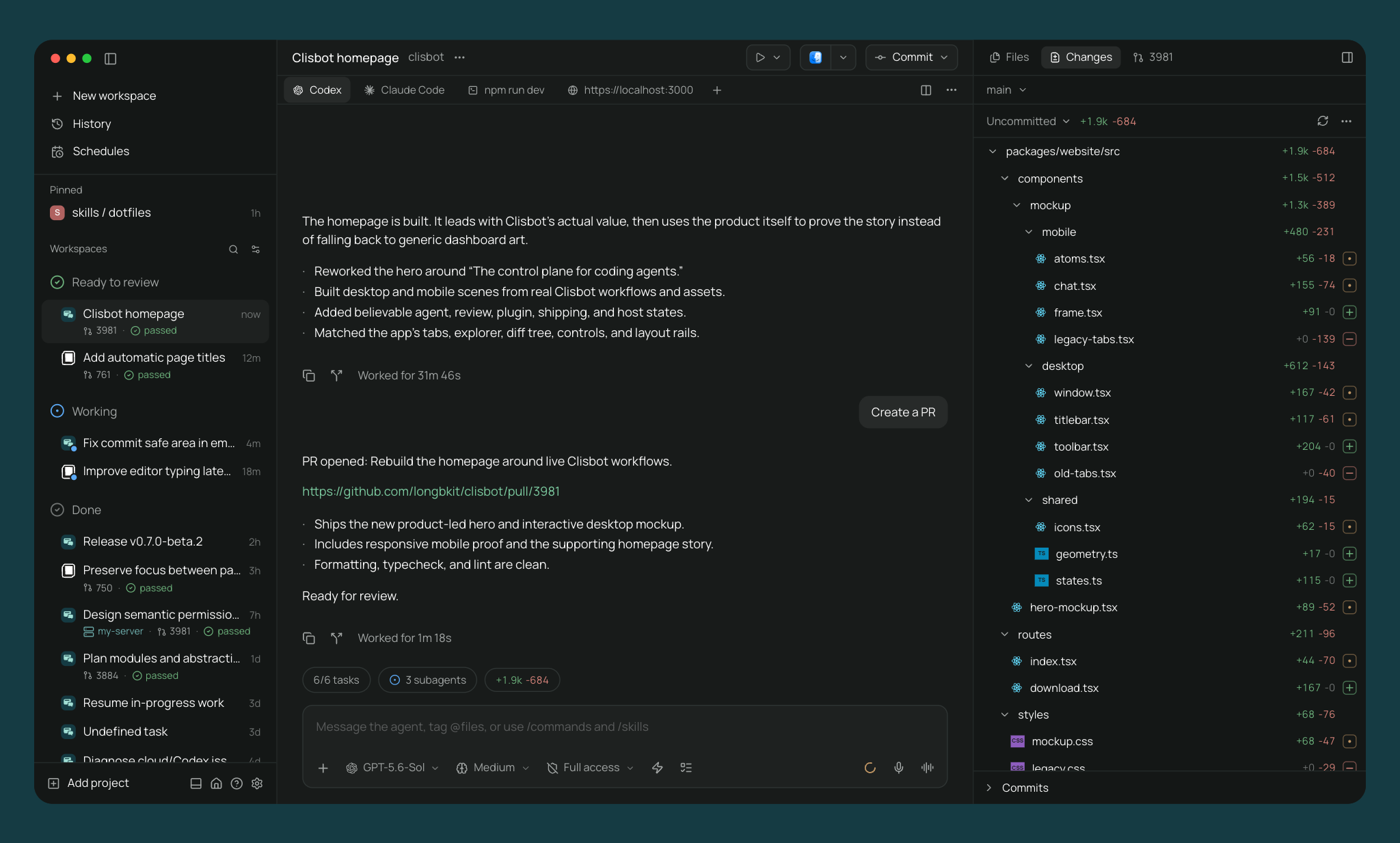
Clisbot is an open source agentic development environment. Run parallel agents in separate worktrees, edit files, review diffs and pull requests, and test your app with terminals and a built-in desktop browser. Available on desktop, mobile, web, and CLI under Apache-2.0.
The main difference
OpenCode connects many model providers through the OpenCode agent runtime. Clisbot runs OpenCode alongside independent Claude Code, Codex, Pi, ACP, and custom agent harnesses.
OpenCode provides terminal, IDE, web, and beta desktop interfaces. Clisbot adds native iOS and Android clients, managed worktrees and services, pull-request workflows, and application plugins.
Architecture
Clisbot runs a daemon on your machine. Desktop, web, mobile, and CLI clients connect to it over a websocket. The daemon launches OpenCode and other providers as local processes, using your installed CLIs and credentials.
OpenCode Desktop is the desktop app for OpenCode. OpenCode is available as a terminal interface, desktop app, IDE extension, web surface, and integrations.
Providers
OpenCode is a multi-model coding agent. It can connect to many LLM providers through its own provider system, including OpenCode Zen, local models, and API providers.
Clisbot is multi-provider at the agent harness layer. It runs OpenCode, Claude Code, Codex, Pi, Antigravity, and Muse Code natively, plus 30+ more agents through the in-app catalog including GitHub Copilot, Cursor, Gemini CLI, and Amp. Clisbot speaks the Agent Client Protocol, so any ACP agent works. Custom providers run any CLI agent. See all supported providers.
Application plugins
Clisbot plugins extend Clisbot itself. They can add server behavior and native client components such as workspace panels, sidebar items, composer attachments, themes, and Command Center items across desktop, browser, iOS, and Android.
OpenCode Desktop does not document an application extension API for adding both server behavior and native client components.
Desktop platforms
Clisbot ships on macOS, Linux, and Windows. OpenCode provides beta desktop builds for the same platforms.
Mobile
The mobile app is the full app, native on iOS and Android, with full feature parity with desktop.
OpenCode Desktop is a desktop app. OpenCode also has web and share-link workflows, but not a native mobile app.
Panes
Clisbot's app has split panes and tabs (⌘D for vertical, ⌘⇧D for horizontal). Panes include agents, terminals, a diff viewer, and a browser for testing running services.
OpenCode is available in terminal, IDE, and desktop surfaces. Its core workflow centers on OpenCode sessions.
GitHub
Clisbot's app handles commit, push, opening PRs, watching checks and reviews, and merging.
OpenCode has GitHub and GitLab integrations, and OpenCode sessions can make and review code changes through its agent workflow.
CLI and automation
OpenCode has its own terminal interface, CLI, IDE extension, GitHub and GitLab integrations, and share links.
Clisbot's CLI controls the same daemon as the app:
clisbot run --provider opencode "implement OAuth"
clisbot run --provider claude --worktree refactor-auth "refactor auth"
clisbot run --host devbox:6767 "run the test suite"
clisbot ls
clisbot send <agent-id> "add tests"
clisbot schedule create --provider codex --mode auto-review --cron "0 9 * * 1" "audit the codebase"
clisbot run --host connects to a remote daemon. clisbot schedule runs an agent on a cron. The MCP server lets other agents create worktrees, launch agents, open terminals, and send prompts.
Worktrees and services
Clisbot runs each agent in its own Git worktree. Each worktree gets its own dev server URL like web--fix-auth--my-app.localhost, so parallel agents don't fight for ports.
OpenCode supports multi-session work on the same project. If you want worktree isolation around OpenCode sessions, Clisbot can provide that by launching OpenCode inside Clisbot workspaces.
Privacy and source
Both tools are open source.
Clisbot is Apache-2.0 and runs your agents through a daemon you control. OpenCode is open source and says it does not store your code or context data by default. OpenCode share links are public when you create them.
Voice
Clisbot supports dictation and realtime voice mode. Speech-to-text and text-to-speech can run locally on your device.
Comparison
| Clisbot | OpenCode Desktop | |
|---|---|---|
| License | Open source (Apache-2.0) | Open source (MIT) |
| Account required | No | - |
| Desktop app | Yes (one click install, daemon bundled) | Yes (beta, macOS, Linux, Windows) |
| Mobile app | Yes (native, full parity with desktop) | No |
| CLI | Yes (everything the app does) | Yes (OpenCode CLI) |
| Remote machines | Yes (install the daemon anywhere) | OpenCode server |
| Built-in relay | Yes (opt-in, end-to-end encrypted, no account) | - |
| Direct network access | Yes (LAN, Tailscale, VPN) | - |
| SSH access | Yes | - |
| Providers | Claude Code, Codex, OpenCode, Pi, Antigravity, Muse Code, 30+ more | OpenCode (many model providers) |
| Parallel agents | Yes (isolated worktrees, across machines) | Multiple sessions, no built-in worktree manager |
| Terminal agents | Yes (run any agent in a terminal, get notified when it finishes) | - |
| Agent orchestration | Yes (agents create worktrees and launch other agents, across providers) | MCP support inside OpenCode |
| Editor | Yes | - |
| Terminals | Yes | OpenCode terminal workflow |
| Diff review | Yes (comments go to the agent) | - |
| Pull requests in app | GitHub, GitLab, Gitea, Forgejo, Codeberg | GitHub, GitLab integrations |
| In-app browser | Yes (element picker, agent browser tools) | No |
| Per-worktree dev server URLs | Yes (web--fix-auth--my-app.localhost) | No |
| Schedules and heartbeats | Yes | - |
| Plan usage | Yes | - |
| Plugins | Yes (new screens, panels, agent hooks, and providers, one plugin runs on desktop, web, and mobile) | No |
| Voice | Yes (local dictation, realtime voice) | No |
| Telemetry | None | - |
See also: Clisbot vs Codex App, Clisbot vs Claude Desktop, Clisbot vs OpenChamber.