
Reply suggestions
Suggests editable replies above the desktop composer using your recent conversation and configured model.

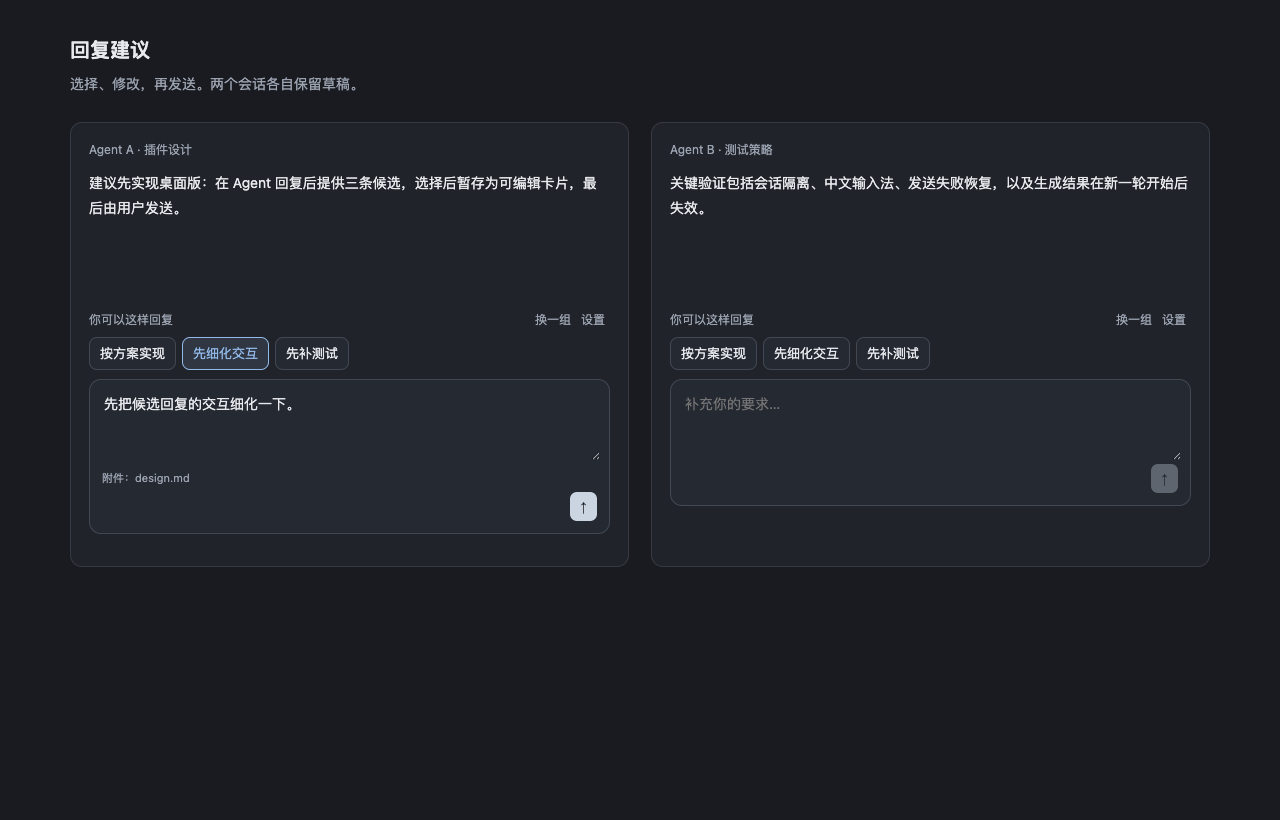
Reply suggestions offers contextual replies above Paseo's desktop composer after an agent successfully completes a response.
Suggestions appear as short buttons. Select one to fill the native composer with its full text, edit or extend it, then send with Paseo's Send button or Enter. Selecting a suggestion does not send it automatically. Existing draft text is preserved when a suggestion is inserted.
The suggestion area stays hidden while generation is in progress or no suggestions are available. It closes after a confirmed submission and returns when new suggestions are ready.
Suggestions belong to the agent whose composer is visible. Leaving that agent's tab expires its suggestions; returning does not restore them. A new successful response or manual generation provides a fresh set. Draft text already inserted into the composer is preserved. Agents still visible in split panes keep their own suggestions independently, including an agent that remains visible in another pane.
Setup and settings
Requires Paseo desktop 0.12.0 or newer (>=0.12.0) with plugins enabled and a signed-in provider. Suggestions use the host's metadata models or a configured provider/model override, with existing provider authentication. No separate API key is needed.
Automatic generation is enabled by default and can be disabled in plugin settings. To generate manually, choose Generate reply suggestions in the command center. When suggestions are available, Try another set requests another set.
Settings include the suggestion count (2–5, default 3), reply language, model override, additional generation instructions, recent conversation length and timeout. The interface supports English and Simplified Chinese and follows Paseo's language by default; reply language is configured separately.
The built-in prompt is displayed read-only and can be copied. Additional instructions can be edited separately.
Data and limitations
Each generation sends recent user and assistant text to the selected provider and uses that provider's normal model allowance. By default, it uses four conversation turns, with a total limit of 16,000 characters. Tool output and reasoning are excluded from the conversation context.
Generation reuses the current conversation's workspace and its project environment. It creates helper agents outside the current conversation's child-agent list, without creating a separate workspace or a generator project. Only helper agents are archived after completion, failure or cancellation; your conversation and workspace remain open. Helpers share the workspace's visibility and may appear in its agent list and archived history. Helper completion notifications are suppressed, while normal conversation completion notifications remain enabled.
Native iOS and Android clients are unsupported. Composer integration depends on the desktop interface structure, so Paseo updates may require a plugin update.
On Paseo 0.12, suggestion and settings content follows the app language automatically. After changing the app language, reload the plugin to refresh settings navigation titles and command names. Newer Paseo versions provide live translation for those labels.