
Herald
Paseo plugin: speaks one sentence when an agent needs you, and lists everything waiting in a sidebar panel

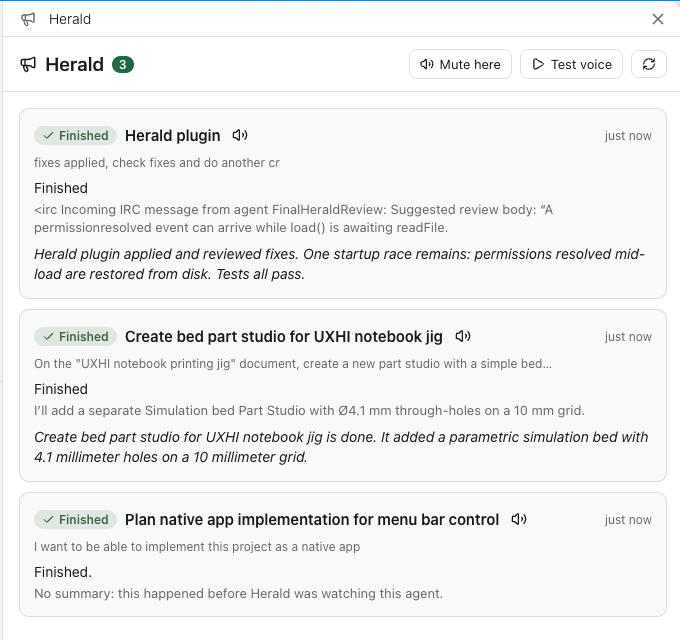
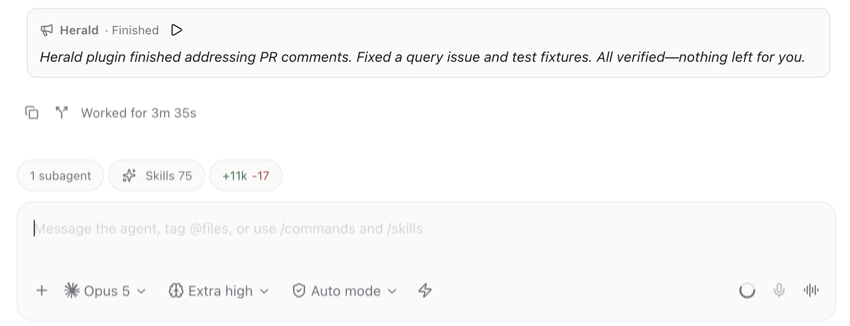
Herald speaks one sentence aloud when an agent needs you, and lists everything waiting in the Herald screen, opened from the sidebar. It announces questions, plan approvals, tool permission requests, finished turns and errors, and also leaves the sentence as a card in the agent's conversation so you can replay it.
The sidebar badge counts waiting agents. Press the badge for a quick list, then choose an agent to open Herald at its card.
For each event a short-lived helper agent writes the sentence with a model you choose (Claude Haiku 4.5 by default). The helper session is deleted once the sentence is written, which you can turn off.
What is sent: for a finished turn, the helper receives your last message and what the agent said after it. For a question or permission request, it receives the question and choices or the command. This text goes to the provider of the model you chose, using your own provider credentials. The prompt can be edited.
Setup and limits:
- Paseo 0.11.0 or newer on the daemon and the device running the app.
- The
paseocommand on the daemon'sPATH. Herald uses it only to delete helper sessions, and without it they accumulate. - Speech plays on the device running the app. The desktop app speaks on its own, and a browser tab speaks after you press Test voice once. Phones cannot speak from a plugin, but Herald can vibrate. The default voice comes from the
saycommand on a Mac daemon, and a non-Mac daemon uses the browser's voice.
Settings let you switch speech on or off per device, pick the voice and speed, choose which kinds of event are announced, and set the summary model and prompt. Agents started by another agent are off by default, so you hear the parent's announcement rather than two.
This plugin entry was imported from paseo.cafe.