
Agent CLI Monitor
Shows running agent CLI instances and their memory use in the Paseo sidebar.

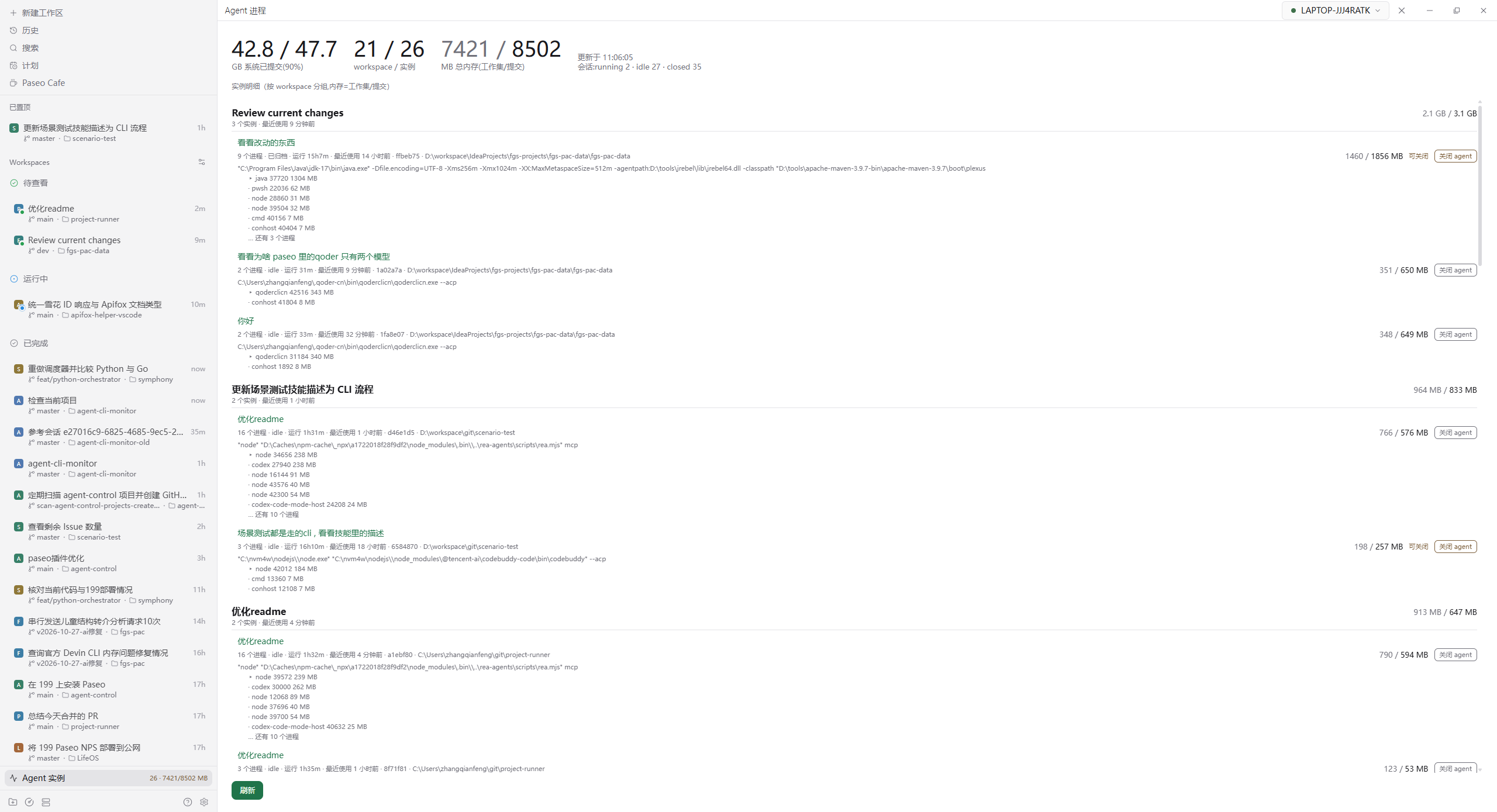
Agent CLI Monitor shows how many agent CLI instances are running on the host and how much memory they use, directly in the Paseo sidebar, without opening a screen.
The daemon enumerates system processes. When Paseo launches an agent it injects PASEO_AGENT_ID into the process environment, and the plugin uses that marker to find instances from every provider, including Claude, Codex, Devin and custom providers, regardless of executable name. Processes are grouped per agent: every marked process and its descendants are deduplicated into one instance and their memory is summed, so a service spawned by an agent, or a CLI left behind after its parent shell exits, is not counted as a separate instance, and overlapping trees are counted once. Each row shows the heaviest process in the instance and lists the top few processes with their own memory. Each instance resolves the owning agent's title, status, working directory, runtime and last-used time.
Last used comes from lastUserMessageAt in the persisted agent record, which is the last time the user sent a message. When that field is missing the plugin falls back to the daemon's lastActivityAt and labels it recent activity. The daemon refreshes lastActivityAt when it loads an agent, including its startup sweep, so using it alone would report idle sessions as recently used.
The screen groups instances by workspace, the parent level in Paseo's sidebar. The group header shows the workspace title, memory total, instance count and the group's last-used time, and opens the workspace when pressed. Each row in a group is one session with its title, process count, status, runtime, last-used time, working directory and memory. A row that is not running and whose user has not sent a message for 12 hours, or whose agent is archived but still has processes, is marked "can close", and its close button is highlighted.
The header shows system committed memory and its limit (Windows: \Memory\Committed Bytes and \Memory\Commit Limit; Linux: Committed_AS and CommitLimit from /proc/meminfo), the workspace and instance counts, and total memory. On Windows memory is shown as working set and commit; on POSIX only RSS is available. Instances and workspace groups are sorted by commit, falling back to working set, because commit is what exhausts the commit limit; an idle devin acp session can grow past 10 GB while RSS understates it.
Each row has a close agent button that closes the agent runtime for that row rather than one specific process. It kills the CLI process through the daemon's agent control plane and persists the session snapshot, but keeps the agent record and history and does not archive it, so opening the agent again restores the session. This is useful for reclaiming memory from idle sessions. The feature requires daemon.mcp.injectIntoAgents: true, which injects a calling credential into each agent. After a daemon restart stored credentials become invalid and the affected agent must be reloaded before the button works again; the screen then shows a readable message instead of the raw MCP error.
Refreshing is manual: the sidebar collects once at app startup and the detail screen updates with its refresh button, so monitoring itself does not consume resources periodically. The detail screen opens from the sidebar row or from Command Center (Ctrl+K) by searching for Agent process monitor. After closing an agent the screen polls at 1s, 2s and 4s and stops as soon as the instance disappears.
Setup requires plugins enabled on the daemon and Paseo 0.11.1 or later. The close action additionally requires daemon.mcp.injectIntoAgents: true. The plugin reads process environments and Paseo's local agent records, including title, status, workspace and last user message time, and does not send data anywhere. On Windows it runs a PowerShell script that reads process environment blocks; on Linux it reads /proc; on macOS it uses ps. Closing an agent uses the credential Paseo injects into an agent and calls the daemon's local MCP endpoint. Manually started CLIs and desktop applications that embed the same binaries are not listed.