
Docker Sandboxes
Run each Paseo workspace's Claude and Codex agents in its own Docker Sandboxes microVM.

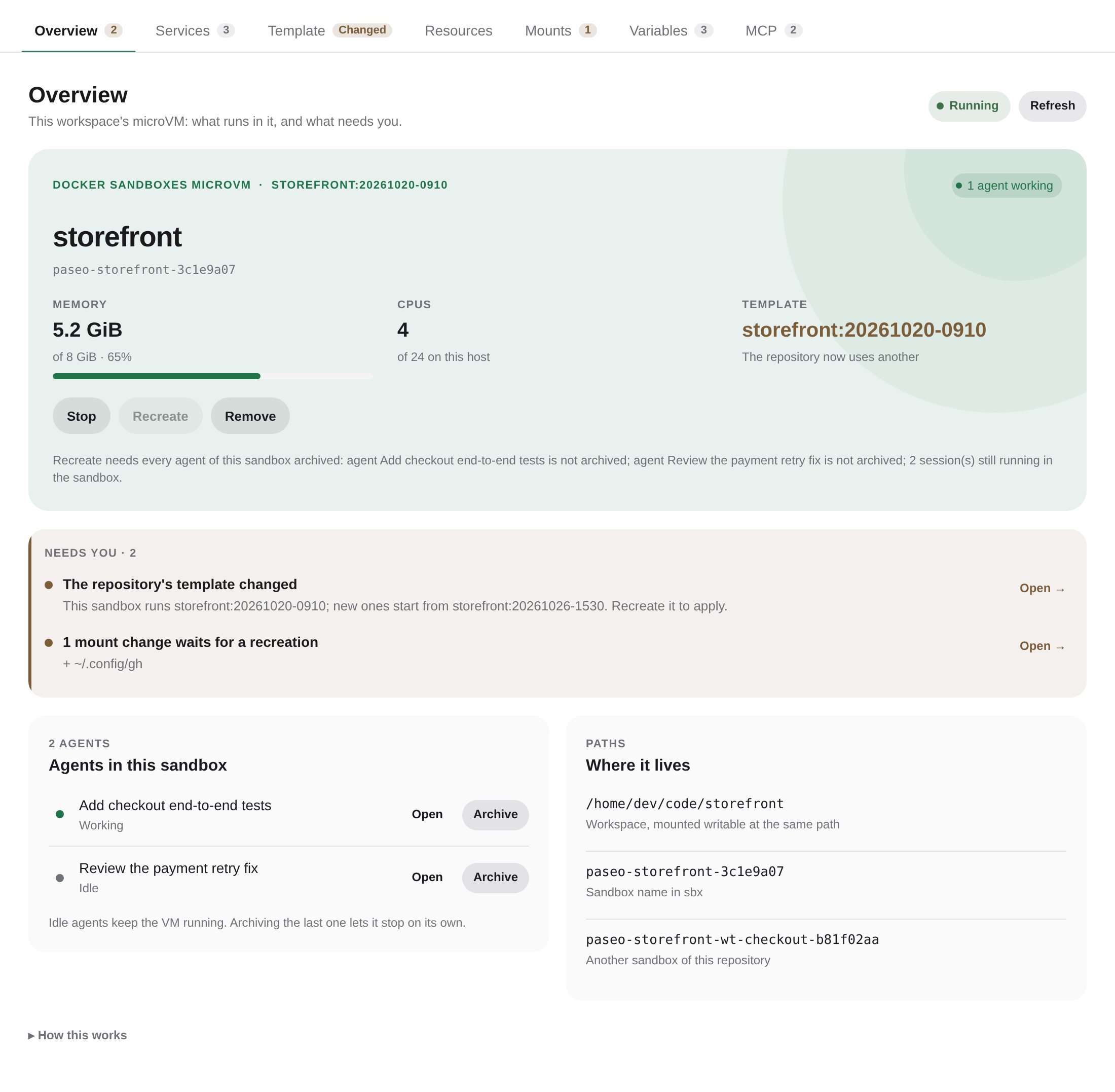
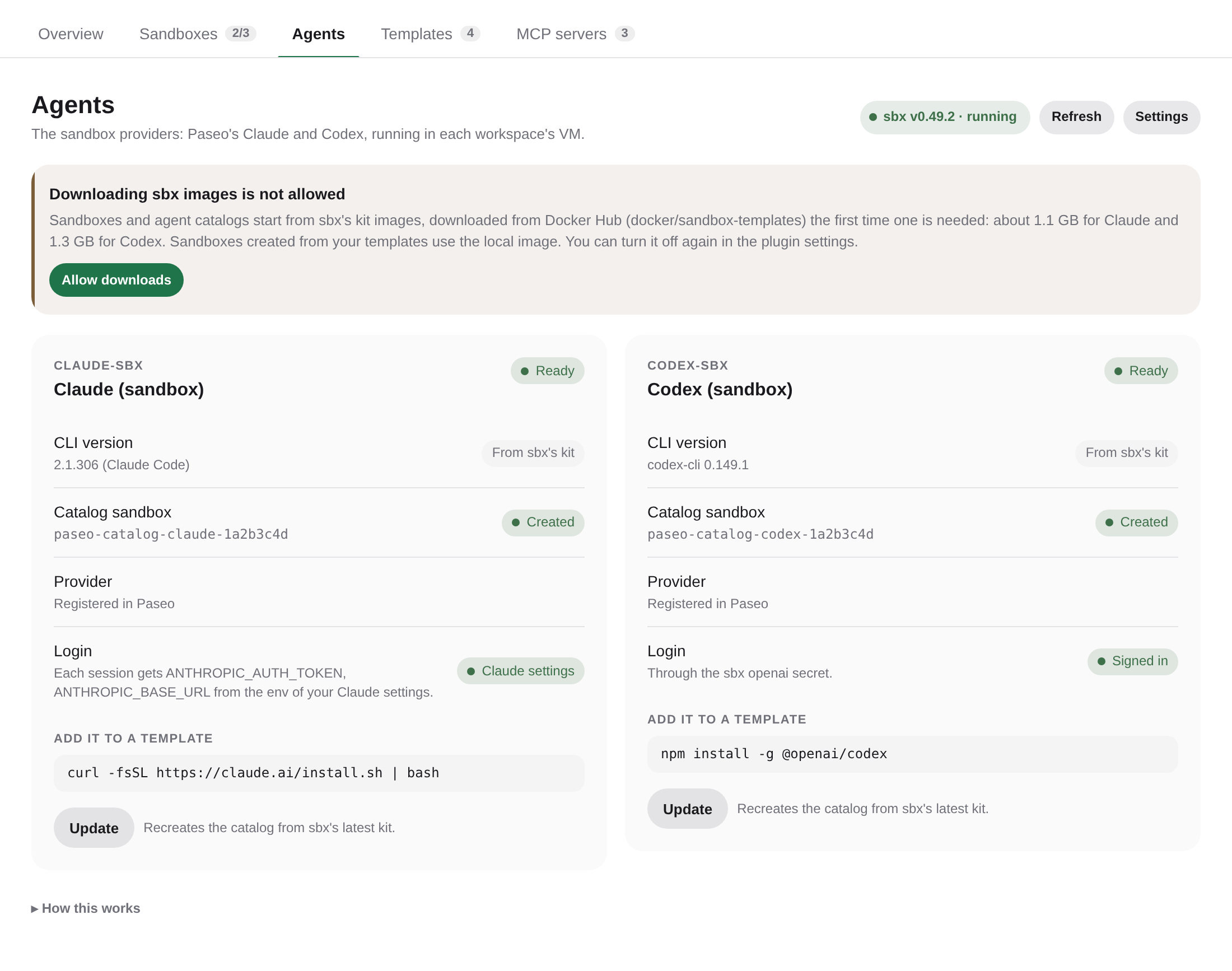
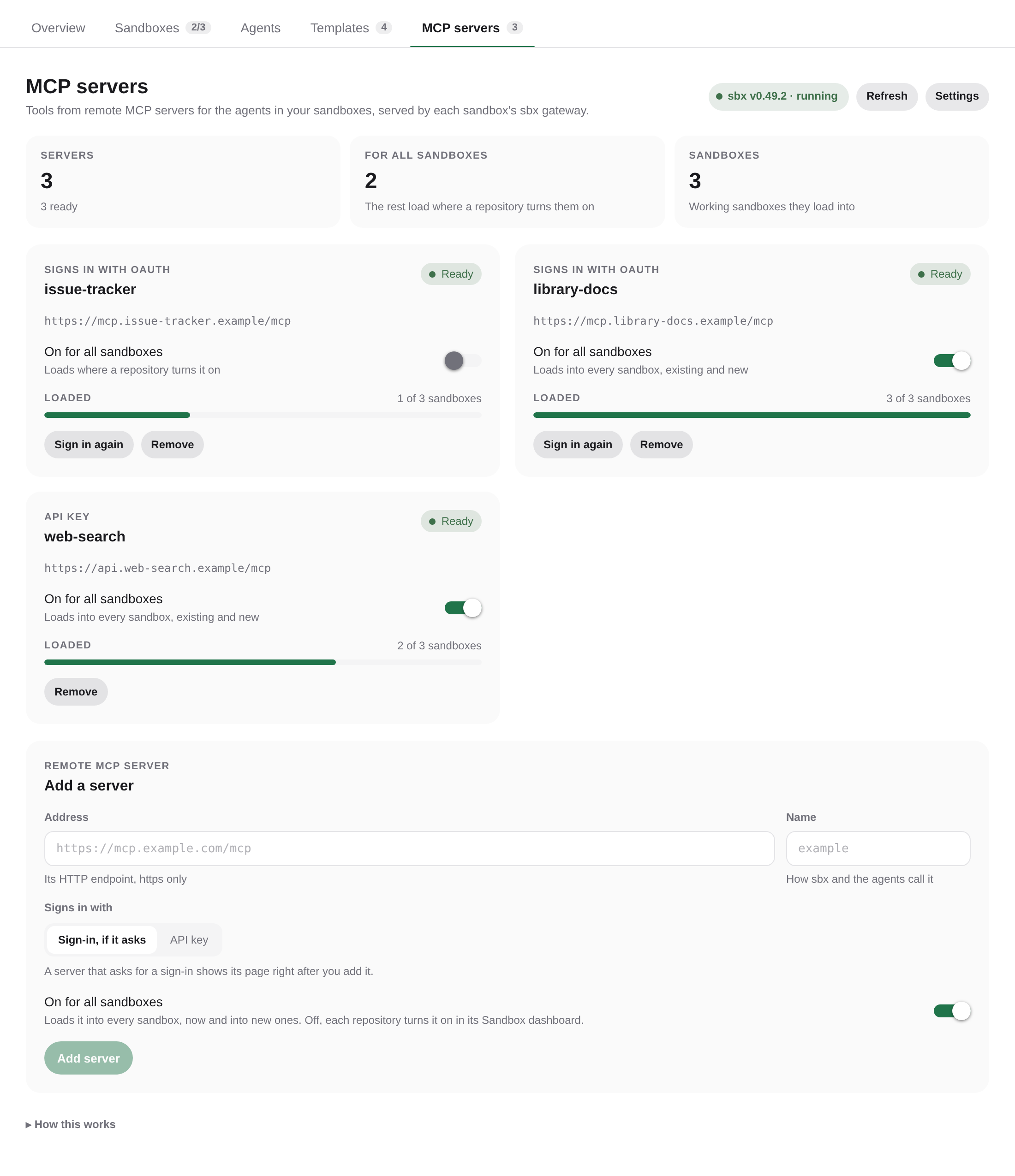
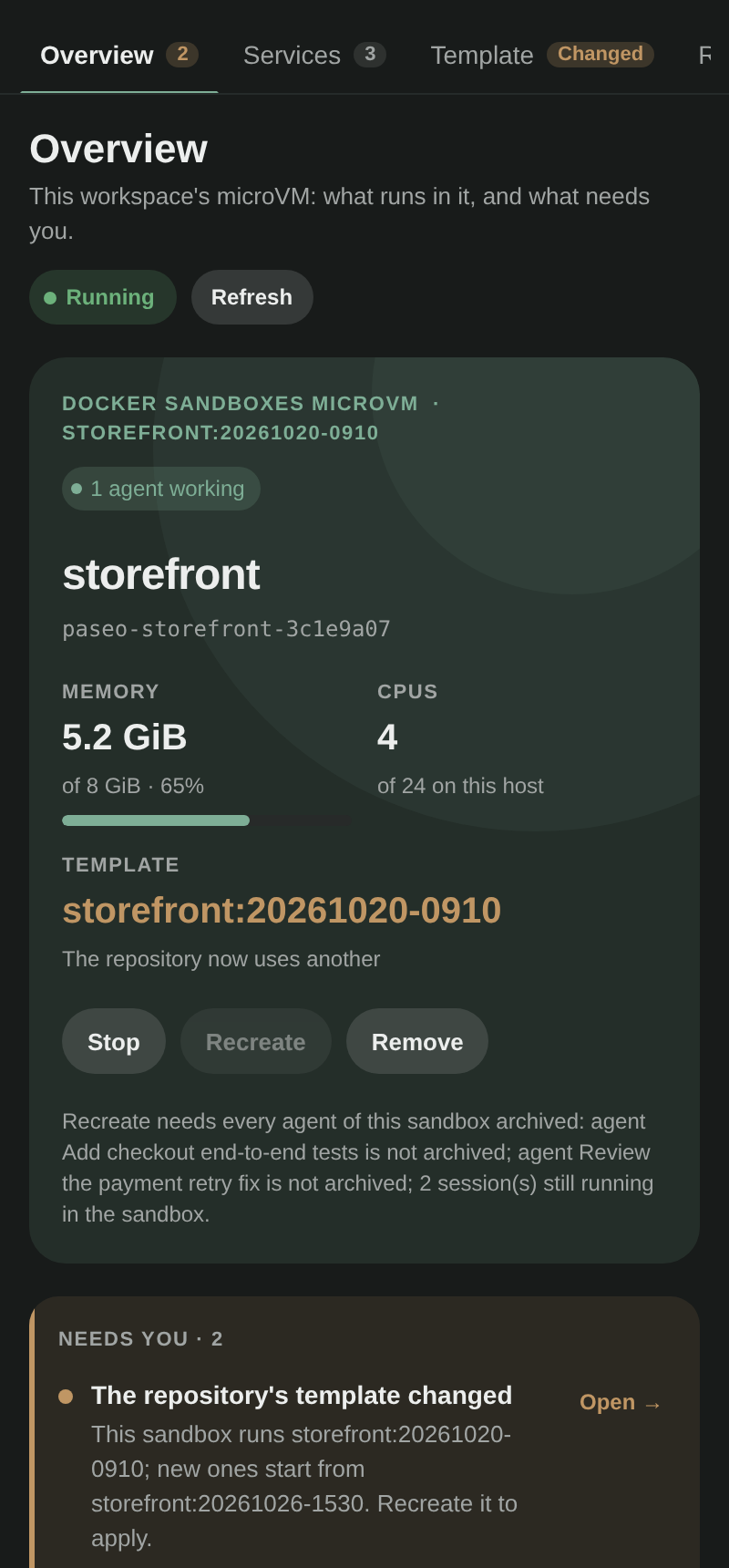
This plugin runs each workspace's Claude and Codex agents inside its own Docker Sandboxes microVM. Agents keep working on the same files at the same paths, but every Docker container, network, port and test browser they start lives in that workspace's VM. Sessions stop interfering with each other: a Postgres on port 5432 in one workspace does not collide with another, and container churn in one workspace no longer breaks Chromium tests in another.
How it works
The plugin adds claude-sbx and codex-sbx providers that extend Paseo's own Claude and Codex integrations. Paseo itself stays on the host; the agent's CLI, from the sandbox's template, and the tools it runs move into the VM. The workspace is mounted at its host path, so the file explorer, diffs and git keep working unchanged. Agents sign in through sbx's secrets, which its proxy adds to their requests: the token never enters the VM.
Sandboxes come from a Docker Sandboxes instance that belongs to Paseo: your own sbx sandboxes are not listed or touched, and Paseo's sandboxes stop when the daemon stops. A sandbox is created the first time a sandboxed agent starts in a workspace and stops on its own 30 seconds after its last agent closes. Each agent also has a small catalog sandbox that answers Paseo's version and model questions, so no agent CLI is needed on the host.
Each sandbox gets its own Claude config directory, with its own settings: they start as sbx's kit sets them, and the plugins you install or the settings you change inside a sandbox stay in that sandbox. From your Claude config directory, skills, agents, commands and rules are linked in read-only and CLAUDE.md is copied at every session. Every session also gets the env of your Claude settings, where a gateway or a key usually lives. Transcripts and state stay per sandbox. Paseo's MCP server and any loopback API endpoint your Claude settings use are relayed into the VM automatically.
Other MCP servers reach agents through each sandbox's sbx MCP gateway. Register remote ones in the MCP servers tab of Docker Sandboxes, signing in with OAuth or giving an API key, and choose which load into every sandbox; a workspace's Sandbox dashboard turns each on or off for its repository. sbx signs in on this host and adds the token to the gateway's requests, so it never enters a VM.
Setup
Requires a Linux host with the Docker Sandboxes CLI (sbx) installed and signed in, and Paseo 0.13 or later. The sbx login lives in the OS keyring, which must be unlocked; on a headless host use a keyring without a password.
Turn on the agents you want under Agents in the plugin settings, then open Docker Sandboxes in the sidebar and press Configure for each in its Agents tab, allowing the download of sbx's kit image when it asks. Store the agent's login once with XDG_STATE_HOME=~/.local/state/paseo-sbx/sbx sbx secret set <service> (openai, with --oauth for a ChatGPT login; anthropic if your Claude does not already sign in through its own settings) and press Update. Then pick Claude (sandbox) or Codex (sandbox) when creating an agent, or turn on Run new Claude agents in sandboxes.
Settings
- Agents: which sandboxed agents the plugin registers (Claude by default). Turning one off disables its provider and keeps its agents.
- One sandbox per: workspace (default) or directory. Workspaces that share a directory get separate VMs in workspace mode.
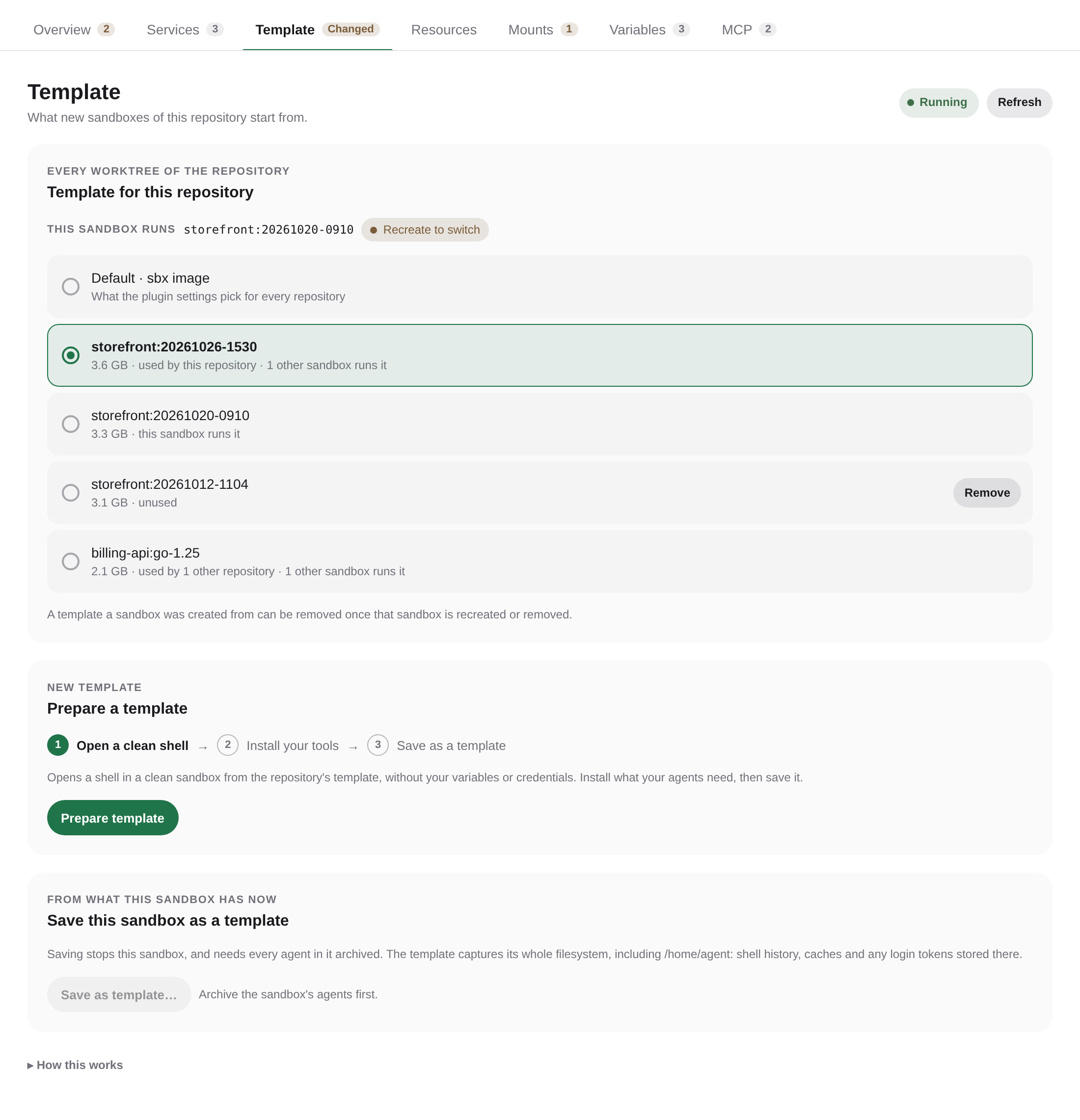
- Templates: a default template for new sandboxes, and one per repository in the workspace's Sandbox dashboard. Prepare template opens a shell in a clean sandbox to install your tools, then saves it.
- Resources: memory as a percentage of host RAM per sandbox (10% by default) with a minimum, CPUs (all by default) and the size of the VM's Docker disk (sbx's 10 GB by default). A repository picks its own memory and CPUs in the workspace's Sandbox dashboard. Builds start a process per CPU, so a repository with little memory may need fewer CPUs.
- Extra mounts: shared tool state and credentials your agents need, for every repository or for one in its Sandbox dashboard (
:rofor read-only). A mount under your home also appears at the same place under the agent's home. Install tools in a template instead. - GSD Path: a repository with a
.gsd-pathdirectory gets~/.gsd-pathand the member checkouts listed in.project/MEMBERS.md, writable. The Sandbox dashboard lists the members. - Shared Claude config items: what each sandbox gets from your Claude config directory,
CLAUDE.md,skills,agents,commandsandrulesby default. Folders are linked read-only; files are copied at every session, so a file Claude or an editor saves by renaming a new one over it still reaches the sandbox. Yoursettings.jsonis left out by default: add it to share all of it instead of each sandbox keeping its own. - Forwarded variables: names of the variables your agents get from your shell profile, for every repository or for one in its Sandbox dashboard. The daemon does not load your shell profile, so values come from a dotenv file (
~/.config/paseo-sbx/envby default; your shell's env file works too,export NAME=valuelines included), then the daemon environment. Only Claude and Paseo variables reach the sandbox automatically. - GitHub over HTTPS (on by default): GitHub SSH remotes go over HTTPS inside the sandbox, where the sbx proxy signs in with your token. Store it once with
XDG_STATE_HOME=~/.local/state/paseo-sbx/sbx sbx secret set github --command "$(command -v gh) auth token"; the token never enters the sandbox. - Allowed destinations and Extra host ports: the sandbox network policy and additional host loopback ports to relay.
- Excluded paths: workspaces that keep running Claude on the host when routing is on.
Services
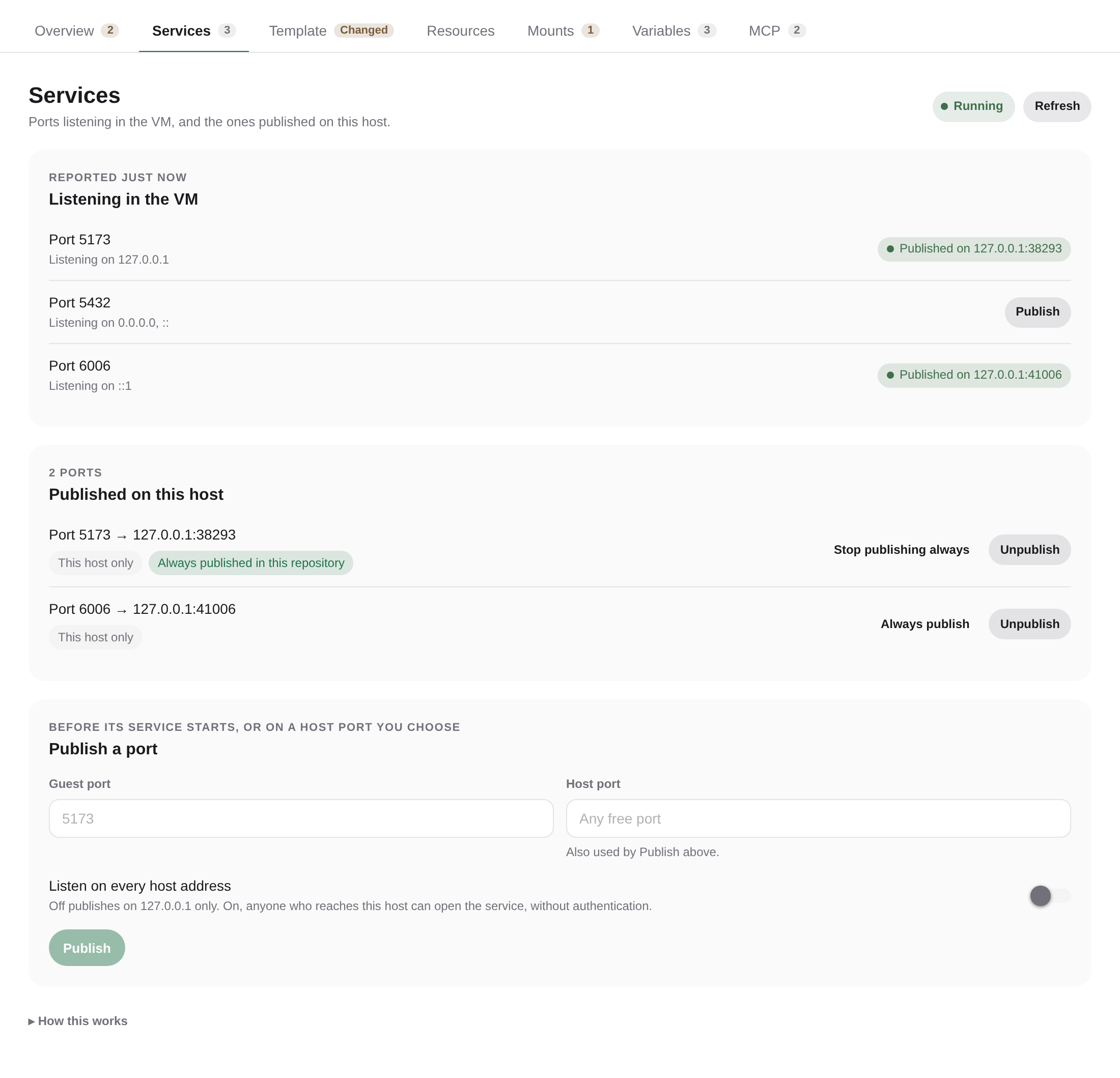
The workspace Sandbox dashboard lists the ports listening inside the VM. Publish makes one reachable from the host, on 127.0.0.1 by default or on every host address, with a port picked for you or fixed. That is how you check an app an agent started in the sandbox, without building it on the host. A port can be published for every sandbox of the repository, and services listening only on the VM's loopback work too.
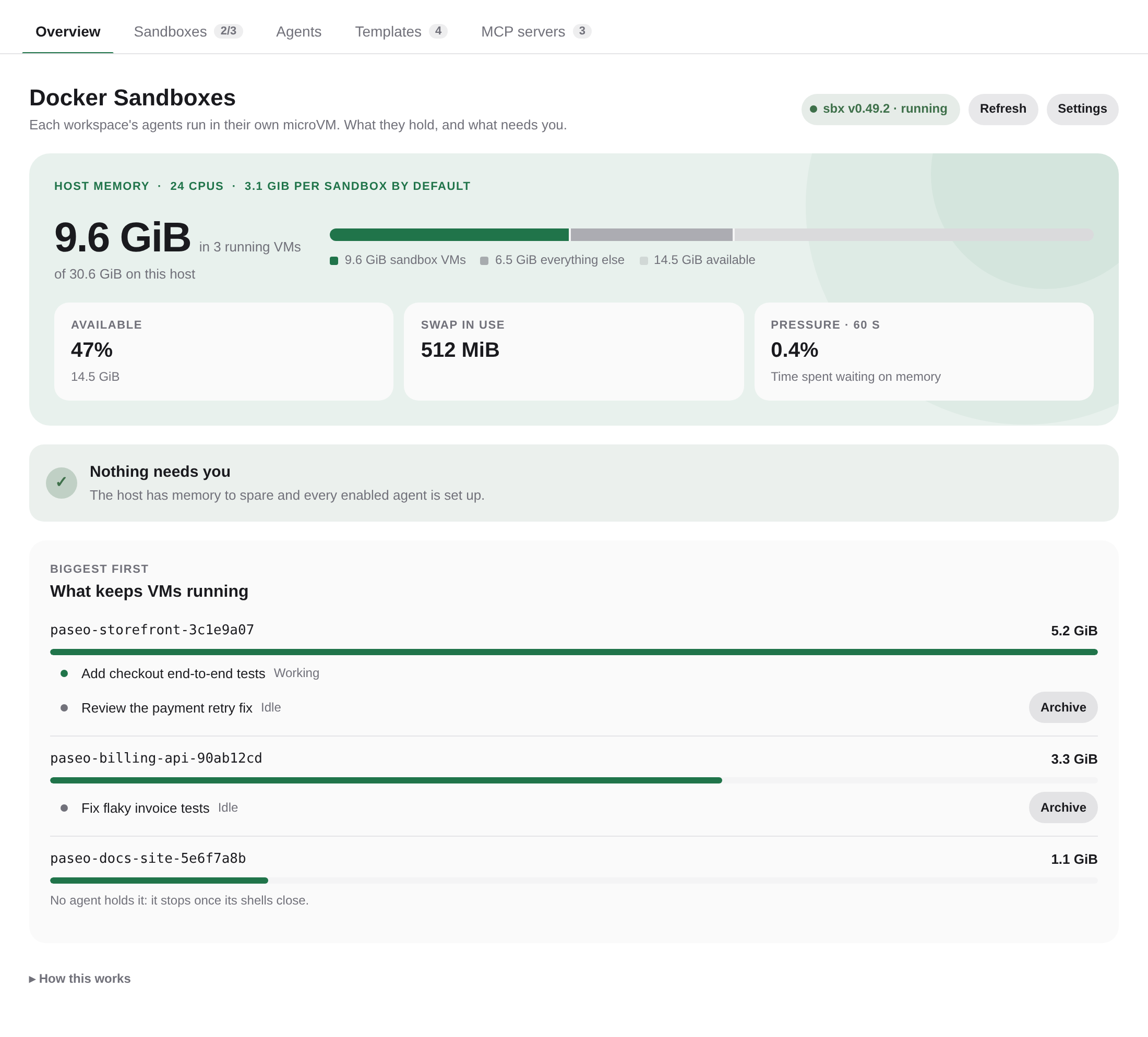
The Docker Sandboxes screen opens on the memory the VMs hold, the host's available RAM, swap and memory pressure, with an alert past configurable thresholds, and the agents keeping each VM running, with an Archive action. Its other tabs list the sandboxes, the agents with their setup and login, the templates, and the MCP servers. The workspace Sandbox dashboard opens on the sandbox, the agents keeping it running and what needs you, such as a change that waits for a recreation, each with a link to the tab that fixes it: Services, Template, Resources, Mounts, Variables and MCP. Settings for a repository apply to every worktree of it.
For manual checks, Sandbox terminal in the workspace's + menu, or Open sandbox terminal in the command center, opens a shell inside the VM in the workspace, creating the sandbox when needed. It has the sessions' Claude config and login: claude there sees the same settings, plugins, agents and transcripts (claude --resume lists the sandbox's sessions), with sbx's MCP gateway. The shell's own ~/.claude is sbx's kit config, which nothing uses. The terminal is a profile the plugin adds to Paseo's terminal profiles the first time a Docker Sandboxes view opens; with none stored, Paseo's default profiles are stored with it. Removed in Settings, it stays removed.
Data and downloads
Agents send their prompts and tool results to their provider, Anthropic or OpenAI, or to the gateway your Claude settings name, as they do on the host. Requests leave the VM through the sbx network proxy on this host, which adds the stored secret. The plugin sends nothing anywhere else.
MCP servers you add receive the calls agents make to their tools, through the sbx gateway on this host. A sign-in is sbx's OAuth flow: the provider's page opens in your browser, and the address it then sends the browser to goes back to sbx on this host, pasted by you when that browser runs on another device. sbx keeps the tokens and API keys in the OS keyring; an API key is handed to it over stdin and is stored nowhere else. If sbx changes how it records MCP servers, Report on GitHub opens a prefilled issue in your browser, with paths under your home shortened to ~; nothing is sent until you submit it.
Nothing is downloaded until you allow it. Configure and Update, and a sandbox or template preparation without a template, can download the agent's sbx kit image from Docker Hub (docker/sandbox-templates), about 1.1 GB for Claude and 1.3 GB for Codex, so they ask first; declining runs nothing. Your answer is the Allow downloading sbx images setting, which you can turn off again. Sandboxes created from your templates use the local image, and templates you save stay on this host, in Paseo's sbx instance. Inside a VM, agents download what they need as they would on the host, within the network policy.
Agents in a sandbox see the workspace, the mounted folders and the forwarded variables. Transcripts, catalog records and sandbox state stay under ~/.local/state/paseo-sbx.
Limits
- Terminals, workspace scripts and services from
paseo.jsonstill run on the host. - A template carries the CLIs of the agents it was prepared with: a workspace running Claude and Codex needs a template with both. Codex in a sandbox created before agents shared their homes asks for a Recreate. Importing Codex sessions from the host's
~/.codexis not supported. - Template, mounts, memory, CPUs and Docker disk are fixed when a sandbox is created. Recreate applies new ones once every agent of the sandbox is archived; it discards what runs inside the VM. Existing agents keep the sandbox they started in when you change the isolation mode.
- Templates do not include the images of the VM's own Docker: each new sandbox pulls them again.
- Stop in the panel shuts the VM's Docker down first. The automatic stop 30 seconds after the last agent, and a restart of Paseo, are abrupt for what runs inside: databases go through crash recovery on the next start.
- Memory figures, and which MCP servers each sandbox has loaded, come from internal details of Docker Sandboxes 0.49. A later version that changes them shows memory as unknown, and the plugin says when it cannot read the MCP record. Linux only.
- Only remote MCP servers: a local one would run on this host, outside every sandbox.
- Each open workspace keeps a VM running, about 1 GB of memory at idle plus its workload, and each VM has its own image cache on disk.
- Plugins and hooks are set per sandbox, inside it; those that call host-only binaries fail there. An
apiKeyHelperin your Claude settings does not reach sandboxes: store theanthropicsecret instead. - This is process isolation, not a security boundary: the default network policy allows everything and forwarded variables are visible to agents.