
Baton
Writes a handoff document when a Paseo agent goes idle, then lets you continue the task in a fresh agent.

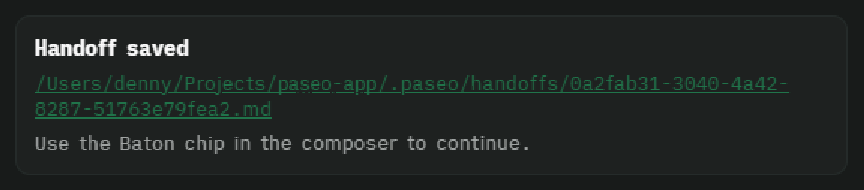

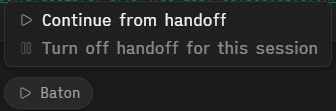
Baton saves your agent's work state when you walk away. When an agent finishes a turn and stays idle for a while, Baton writes a handoff document so the next agent can pick the task up without re-reading the whole conversation.
It helps when you step away from a long coding session and want to continue later in a fresh agent, or hand a task to a different model.
How it works
When an agent turn ends, Baton starts an idle timer. If no new turn starts before it fires, a
short-lived writer subagent drafts the handoff from the conversation, and Baton saves it as <agentId>.md in
.paseo/handoffs in its workspace (or your configured storage location), using the template Task, Context,
Relevant files, Current state, What was tried, Decisions, Acceptance criteria, and Constraints. If the writer
fails or saves nothing usable, Baton writes a mechanical handoff from the conversation instead, with no model
call. A session started with Continue from handoff gets the handoff it came from included in the next draft, so
the original task is not lost down a chain of handoffs.
Once the file exists, a "Handoff saved" row appears in that agent's chat; clicking its path opens an in-app view of the handoff for review, with a button to open the file in your default app. Every agent has a Baton chip in the composer that opens a menu:
- Continue from handoff (only when a handoff exists) creates a new agent in the same workspace
titled
[Handoff] <short title>(a short summary the writer adds so you can recall the work later) with the prompt to read the file and continue the task. The row in the original tab updates to say which tab it was continued on, with an Archive this tab link. - Create handoff now writes the handoff immediately instead of waiting for the idle timer. It is available only for an idle session that has no handoff yet and has handoffs turned on, and is hidden in an ignored workspace or project.
- Turn off / Turn on handoff for this session stops Baton from writing a handoff for that agent. The state is saved, so it survives restarts. Turning off is disabled once a handoff exists. In an ignored workspace or project the menu shows a disabled note saying so instead of the toggle.
If you keep working in the original session after a handoff was saved and nobody continued it, Baton deletes the stale handoff file by default; a setting turns this off. A handoff that was already continued in a new agent is kept. The "Handoff saved" row stays in the chat history, but its link then says the handoff can no longer be opened.
Setup
Requires Paseo 0.13.0 or newer. No accounts, tokens, or external tools. Settings are configurable in the plugin settings.
Settings
Settings live under Settings -> Plugins -> Baton. Changes are saved automatically a moment after you make them, and the bar at the top shows when that is done.
- Idle delay (
idleDelayMinutes, default 15, 1-240): how long an agent sits idle before a handoff is written. It does not depend on any provider's prompt cache. The countdown starts when the agent's own turn ends. - Wait for subagents to finish (
waitForSubagents, default on): if agents started by this one are still working when the countdown ends, Baton restarts it instead of writing the handoff. A subagent still running after 4 hours, one running when the plugin restarted, and provider-internal subagents (such as Claude's Task tool) are not waited for. "Create handoff now" ignores this. - Handoff writer (
handoffProfileId): pick one of your Paseo agent profiles. Its provider, model and effort are used; its mode is ignored. The default, "Same as running agent", uses the idle agent's own model and effort. The writer is asked to reply with the document, and Baton also accepts a file the writer saved itself. It is a short-lived subagent of the idle agent: it appears under that agent's subagents, Paseo sends no "finished" notification for it, and Baton leaves it there after it finishes so you can open it and read exactly what it was given. Only the latest writer for an agent is kept, because starting the next handoff archives the earlier one, and Paseo archives the rest with the idle agent. The idle agent's own chat only shows the Handoff saved row. - Conversation detail (
conversationDetail, default Standard): how much of the conversation the writer sees. Compact reads up to 1,000 history entries and keeps about 30,000 characters, Standard 2,000 entries and 60,000, Full 5,000 entries and 150,000. Long messages keep their start and end. When the conversation is longer than what was read, the writer is told and the "Handoff saved" row says earlier history was cut. - Include repo state (
includeRepoState, default on): adds the branch, changed files and recent commit titles from git to what the writer sees. Turn it off to keep file names and commit messages out of it. - Storage location (
handoffDirectory, default empty): where handoff files are saved. Empty means.paseo/handoffsinside each workspace. A custom value can be an absolute path,~/..., or a path relative to the workspace. Files are named<agentId>.md. Existing handoffs keep their saved path. If the location can't be used, Baton saves to the default folder instead and the "Handoff saved" row says why. - Delete unused handoffs when a session resumes (
deleteStaleHandoffs, default on): removes a handoff file that nobody continued once you keep working in the original session. Turn it off to keep every file. The chat row can then no longer open it, but the file stays on disk. - Clean up old handoffs automatically (
cleanupOldHandoffs, default on) and Clean up after (days) (cleanupAfterDays, default 3, 1-365): when Baton starts and once a day after that, it deletes handoff files nobody continued that are older than the limit, counted from when they were written. Handoffs you continued are kept. - Ignored projects and workspaces (
ignoredProjectIds,ignoredWorkspaceIds): switches grouped by project. Ignoring a project covers all its workspaces, including ones created later; ignoring a workspace covers just that one. Ignored agents never produce handoffs. - Ignore new projects by default (
ignoreNewProjects, default off): projects are active unless you ignore them. Turn this on to ignore projects that appear later until you switch them on. Projects that exist when you turn it on keep their current setting.
Data
Writing a handoff sends part of the conversation to an agent provider. The writer agent receives a draft that Baton builds from the agent's conversation, which it reads back from Paseo when it writes the handoff:
- the first request, the user's messages and the agent's replies (long ones keep their start and end, within the size set by Conversation detail, with the oldest dropped first);
- the files the agent touched, and a short list of its recent tool calls that name a file, URL or label (repeats are counted, and shell commands are left out);
- the agent's latest task list and plan, error messages (cut short), failed shell calls named only by program and exit code, never by command line, short descriptions of work handed to sub-agents, and a note when the agent's own conversation was compacted;
- unless you turn it off, the repo state, which Baton gathers itself with read-only
gitcommands (branch --show-current,status --short,log -n 8) in the workspace, withcore.fsmonitoroff and no optional locks so the repository's own configuration cannot run anything; - when the session was started with Continue from handoff, the text of the handoff it came from. Baton reads
only a handoff it recorded or a
.mdfile in a folder calledhandoffs, by an absolute path.
Tool output is not included. The writer runs on the provider and model of the profile you pick, or on the idle agent's own provider and model by default, so that provider sees this text. The writer subagent keeps the prompt it was given, visible in the Paseo app until it is archived. If the writer fails or times out, Baton builds a fallback summary locally and makes no further model call, but a failed writer attempt may already have sent the draft to its provider.
Each handoff file starts with a Created: timestamp, and the "Handoff saved" row shows when it was
saved.
Handoff files stay on the machine that runs the Paseo daemon, in .paseo/handoffs inside each
workspace or in the storage location you set. They contain a summary of the conversation, so keep
that folder out of version control if the work is private. Baton's own state file is in
~/.paseo/plugin-data/baton. Baton makes no network requests and never reads credentials. The "Open
in default app" button hands the file to your operating system's opener.
Capabilities and limits
Entries persist in a JSON file under the daemon home, so a daemon restart recovers pending handoffs,
skips expired ones, and re-appends chat rows for saved handoffs. A handoff is written at most once
per idle period. Subagent tool calls are not handed off because they are provider child sessions
rather than agents. Done entries are pruned when the agent is archived or after 7 days. Chat rows
live in daemon memory and are restored after a daemon restart. Baton reads agent lifecycle events
and the conversation through Paseo, runs read-only git commands in the workspace, and writes handoff files
and its own state file. It never logs secrets.