
ByTheWay
ByTheWay (btw) — use /btw to ask beside your main Paseo session, with provider-native model, thinking, mode and feature controls, live tool activity, subagent management and per-model settings memory.
$ clisbot plugin add casonmo/bytheway

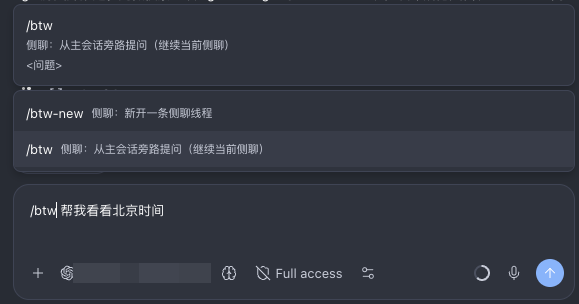
Side chats for any Paseo agent session: ask questions or run small side tasks while the main session keeps working, and nothing is written to the main transcript.
How it works
Each side thread is backed by a temporary agent in the same workspace:
- When a thread starts (from the panel or the
/btw-family commands), the plugin reads the main session's recent conversation as a first-turn context snapshot and sends the question to a side agent; - The panel subscribes directly to the side agent's timeline and streams text, thinking, tool calls, todos, permission requests, and per-turn usage live;
- Paseo child agents and provider-native subagents spawned by the active side agent are merged into a Subagent pill above the composer; the pill is hidden when there are none;
- By default the side agent is linked to the main session: it reads the latest progress on demand through Paseo's built-in tools. When tool injection is unavailable, the plugin falls back to passive sync (incremental context attached to each message);
- Transcripts live in Paseo's own agent timelines. The plugin stores only a thread registry (ids, titles, status) and per-model control memory on the local machine; it never copies Q&A content.
Usage
/btw <question>continues the current side thread (or starts one); a bare/btwjust opens the panel without creating anything;/btw-new <question>starts a new one, and a bare/btw-newopens a fresh thread draft so you can pick the provider/model first;- A command-created or continued thread is selected immediately after the panel opens or refreshes; it never waits for the 20-second thread-list poll;
- The composer renders provider-native controls: Model, Thinking, Mode, and Features. Modes
come from
listModes, feature controls fromlistFeatures, and thinking levels from the model catalog. Unsupported controls are hidden automatically; - Model settings are remembered by default: after a successful send or rebuild, the
effective Mode, thinking level, and Features are stored under
provider/model. Selecting that model again restores them; different models stay independent. Choosing “Follow main” does not apply model memory. The setting can be disabled; - The Subagent pill above the composer shows the active side thread's child count and running state. Open a row to view details; Paseo child agents can be detached or archived, and finished subagents can be cleaned up in one action;
- New threads default to Follow: Mode, Thinking, and Features snapshot the main session when the provider/model match; otherwise the target provider/model defaults are used. Existing threads update in place without replacing the backing subagent;
/fork [prompt]clones the current session transcript into a new parallel agent;- The Command Center can open the ByTheWay panel and its settings;
- The threads dropdown can copy a thread's agent id to the clipboard (for handing the agent to another tool);
- Each thread tab has a ✕ that archives that thread in one click;
- The thread transcript starts with the original user prompt, reconstructed from the initial side-agent message so long threads do not lose the question;
- The bottom hint row links to this repository's GitHub issue form ("Issues & feature requests") — it opens in your system browser and only when you click it;
- On desktop the panel composer sends with Enter and inserts a newline with Shift+Enter (same as the main Paseo composer);
- While a side chat is answering, the composer shows only Stop (when idle it shows only Send); pressing Enter still interrupts the current answer and starts a fresh turn with the new message (a toast confirms);
- Assistant text uses the host Markdown renderer; the UI language follows the Paseo app language;
- The panel shows a banner when a newer plugin version is available on GitHub main, including
the required Paseo version (apply with
paseo plugin update paseo-bythewayin a terminal).
Settings
Settings → Plugins → ByTheWay 侧聊:
- Default model (follow the main session or fixed provider/model). Mode, thinking, and provider feature controls are discovered from the active provider/model; new threads follow the main session when compatible and otherwise use provider/model defaults
- Remember model settings (on by default): restore the last effective Mode, thinking level, and Features for each model
- New threads can pick any provider; existing threads switch models in place within their own provider only
- First-turn snapshot depth, action digest, context fallback
- Attach side agents to the main session as children
- AI thread titles and the title-generation model
- Permission policy (follow the main session / ask + auto-deny timeout / auto-allow read-only / deny all)
- Total concurrency limit and the experimental cancel switch
No account or extra keys are required; the plugin reuses the agent providers configured in Paseo. Requires Paseo 0.13.0-beta.1 or later. The daemon runs on any platform Paseo supports, and the interface works on desktop, web, and mobile clients.
Data and permissions
- Reads: main-session and side-agent timelines through the local Paseo daemon (for context assembly and UI display), plus child-agent metadata and provider subagent status events for the composer Subagent manager;
- Writes: the local plugin data directory
~/.paseo/plugin-data/paseo-bytheway/(thread registry and model settings memory; model memory contains only control ids/values, no transcript content, and keeps the 50 most recently used models); - Network: remote images in side-chat messages load directly from their HTTP(S) URLs on
the client, so the image host receives that request and the client's network address.
Side-chat questions, context snapshots, and tool results are sent to the model provider
you configured in Paseo, exactly like a normal Paseo session. When the panel opens, the
plugin fetches
package.json/paseo-plugin.jsonfrom this repository's main branch onraw.githubusercontent.comto check for updates (version metadata only; no session data is uploaded). The feedback link in the panel opens this repository's GitHub issue form in your external browser, only when you click it. - Permissions: new side agents inherit the main session's mode, thinking level, and provider feature toggles (for example OpenCode's auto-accept) at creation, so permission behaviour matches the main session by default. Tool permission requests from side agents appear inline in the panel for approval or denial; question-type requests render as a step-by-step form (one question per screen, single-select advances automatically, all answers submitted once at the last step). By default the plugin leaves permission handling to Paseo itself ("follow"), so side agents behave like the main session; optional plugin policies can auto-allow read-only requests, deny all, or auto-deny unanswered requests after the configured tiered timeout;
- Stop: cancellation is requested through Paseo's tools first; if it does not take effect, the panel points to the native tab to stop the agent there.
Known limits
- Threads are bound to the daemon and main session that created them. If the main session is archived, threads are marked stopped and can be rebuilt to continue;
- Existing threads switch models in place within their own provider (the provider is
fixed when the thread is created; start a new thread to use another provider). Mode,
thinking, and provider feature changes also apply in place through a short-lived helper
agent calling Paseo's
update_agent; the plugin refreshes the same subagent and verifies the requested values before sending. If any switch fails, the message is not sent and the panel shows why; - AI titles, the experimental cancel, and model/thinking/mode switching create a short-lived helper agent that archives itself when done (it may appear briefly in the agent list);
- Running side chats are limited by the configured total concurrency cap; requests beyond it are rejected with a hint.
- Provider-native subagent details are owned by the Paseo main panel. Until the host exposes a provider-subagent deep link, clicking one of those rows opens the parent side thread first; Paseo child agents open directly.
- The Subagent pill currently aggregates Paseo child agents and provider subagents on the current host/daemon only; agents delegated to another host are not shown yet.
- Model memory uses effective values. If a stored Mode, thinking level, or Feature no longer exists for the current provider/model, it falls back to the current default instead of blocking the send.