
Defer
Defer messages to Paseo coding agents until a chosen time or usage-window reset.

该插件的概览尚未翻译为你的语言,因此以英文显示。
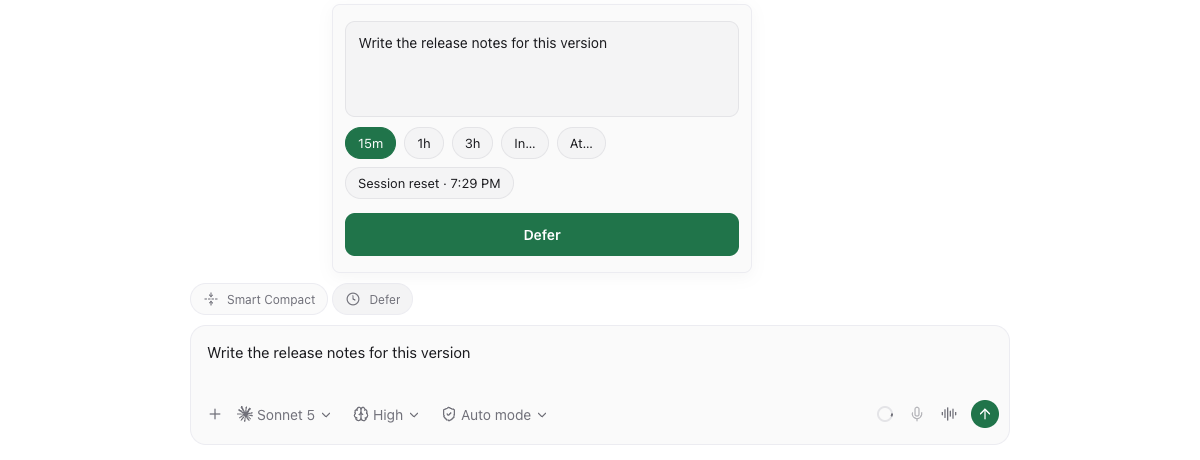
Defer queues a message to an agent and delivers it after a delay (up to 30 days), at a local clock time, or when the agent's provider usage window next resets. When a message is due, Defer waits for the agent to be idle. The queue lives on the daemon and survives reloads, restarts and closing the app.
Queue messages from the Defer composer pill, /defer 2h <message>, Command Center, or the Deferred sidebar. Edit or cancel them until delivery starts. A composer draft is copied into Defer, so clear the original yourself to avoid also sending it immediately; on iOS, enter the message in Defer.
A Deferred message timeline card shows queued text and timing, with Edit and Delete controls. Editing only the text preserves the original delivery time. Apps with the timeline-footer API keep these cards above the composer; older apps show them inline.
Workspaces with waiting or sending messages get a blue Deferred label until their last queued message settles. In Settings → Plugins → Defer → Display, you can hide the sidebar entry and composer button independently. Overview and Display settings link directly to one another. Command Center access remains available while viewing a workspace or plugin on that host.
Interactive Claude and Codex sessions receive tools to list their own active deferred messages and schedule requested follow-up messages for themselves. These tools become available on the next idle session open after installing or reloading; history-only opens receive none. Set the agent label plugin-tools/enabled to "false" to opt out. A scheduled message uses the same queue and idle-delivery rules as the UI.
Data and access:
- Message text, settings and queue/label/timeline journals are stored on the daemon host.
- Delivery uses a separate connection to your configured Paseo daemon, which passes the message to its target agent and selected provider. A Deferral details context attachment includes the trigger, queue time, scheduled time, usage reset when applicable, actual send time and elapsed/late duration.
- For a password-protected daemon, the plugin reads its authentication credentials to connect; it does not log or store them.
- Copying a composer draft reads the app's draft storage on your device only when you ask for Defer.
Requires Paseo 0.14.0 or newer. Delivery uses the daemon's own client library, so hosts that do not expose it cannot read provider usage or deliver messages.