
Paseo Agent Team
Create teams of coding agents with chosen providers and models, coordinated by an orchestrator in shared or separate workspaces.

该插件的概览尚未翻译为你的语言,因此以英文显示。
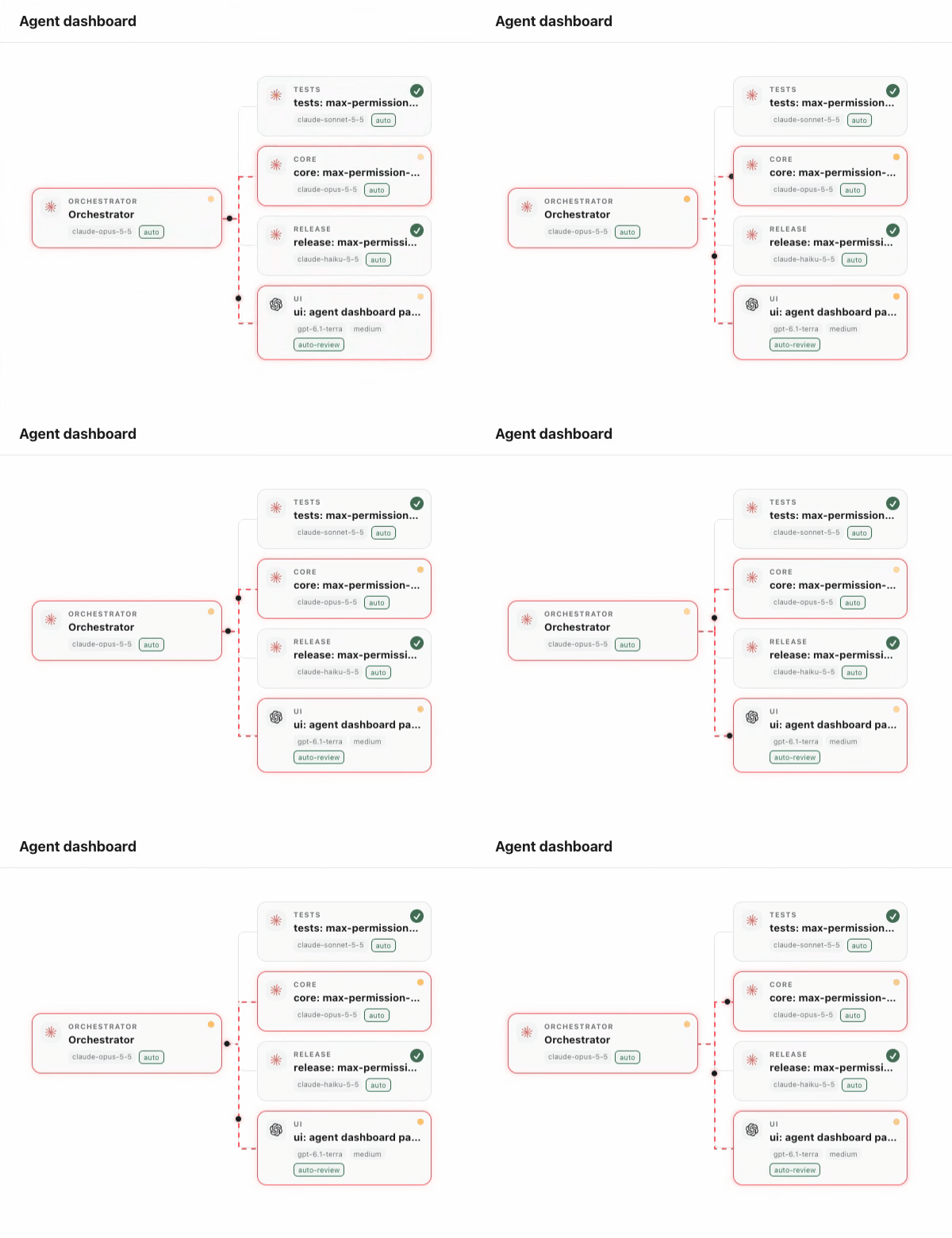
Create a project team in Paseo, with one workspace, provider and model for each role and an orchestrator to delegate your requests. Open the Agent team workspace panel or run Agent teams from the Command Center. The sidebar's Agent teams screen lists every project with its teams, opens a team's panel in its orchestrator's workspace, starts a new team for a project, and reconnects a team whose orchestrator workspace was renamed to another workspace of the project. The Agent dashboard panel opens as a workspace tab or in the right sidebar next to Files and Changes, and shows the project's agents as a tree of agents started by other agents, with status badges and a dimmed waiting card under the orchestrator for each team role not started yet, and opens an agent when its card is pressed on hosts that support client navigation.
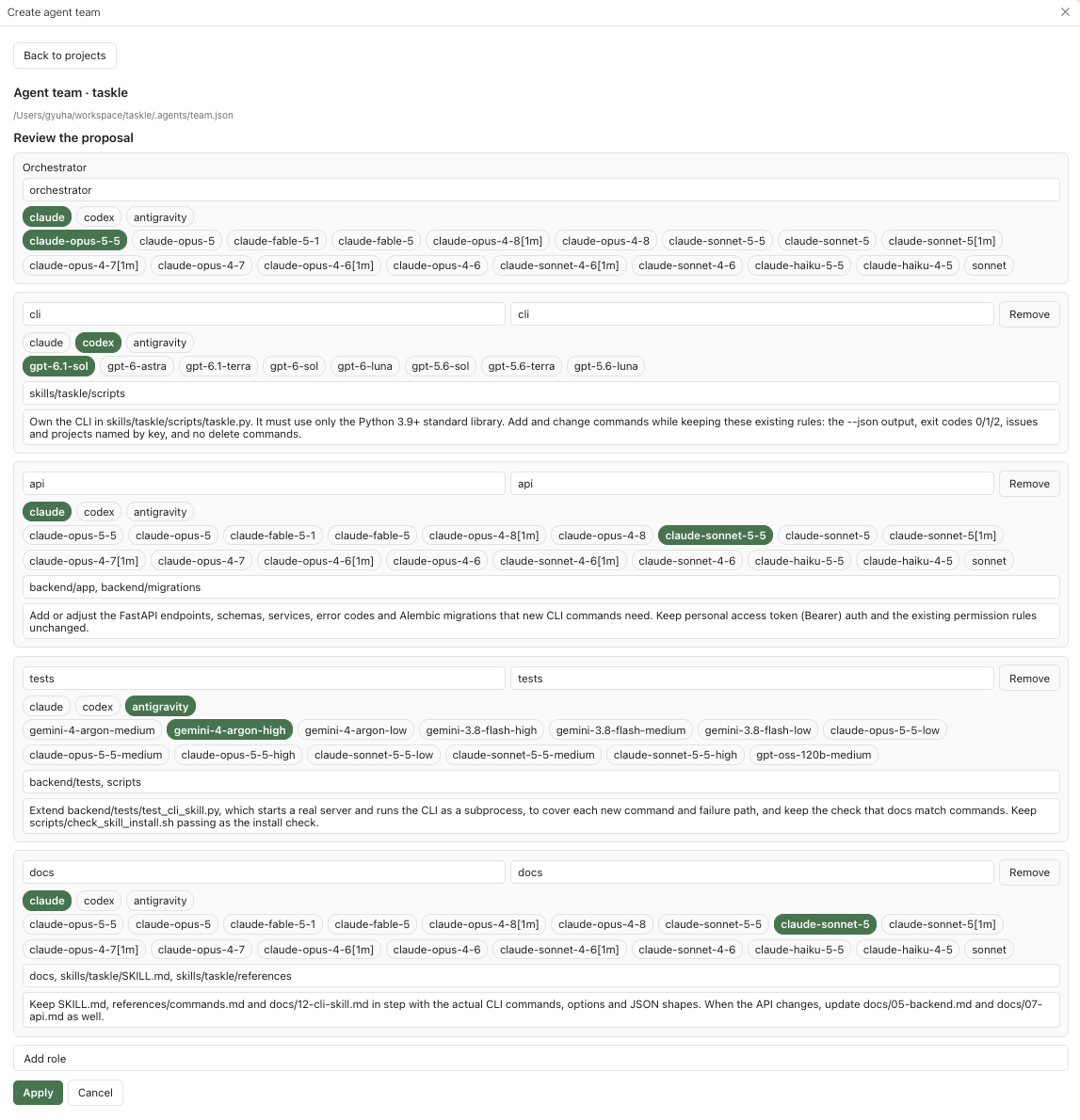
Requires Paseo 0.13.0 or newer and at least one ready provider on the host. Describe your goal to have a planner propose roles, or start with an empty team. While reviewing, describe a role in a sentence or two and use Add role with AI to have a planner propose one more role. A blank role is named role, and a name already in use gets a # and four random uppercase hex characters, such as role#4F2A. Review the workspace names, models, folders and instructions before pressing Apply. A role can leave its workspace empty to run its sessions in the orchestrator's workspace. A proposal survives leaving the screen: reopening it picks up the newest planner for that workspace or project, still running or ready to review. Proposing again or cancelling the review archives the earlier planner.
A project can run several teams, one per workspace: a team belongs to the workspace its orchestrator runs in, and no two teams share a workspace. Apply writes the team to its own file in .agents/teams/ in the registered project root (an existing .agents/team.json keeps being used), reuses project workspaces with matching titles or creates missing ones, and starts an orchestrator. Applying again tells that team's running orchestrator to re-read the team. To reset the orchestrator session with the same team, use the panel's Reset session button rather than /clear, which makes Paseo start an agent without the orchestrator's labels or instructions. When a Claude orchestrator has a role whose chosen mode is unattended, such as Antigravity's full-access, Apply adds the allow rule Bash(paseo run *) to the project's .claude/settings.local.json so Claude's Auto-mode reviewer does not deny starting that role. It then archives the project's plugin-labelled planner agents and unused, otherwise empty Team planner workspaces. Team definitions can be committed to your repository and edited in the panel or file. Deleting a team from the Agent teams screen archives its orchestrator, labelled role sessions and planners still proposing for its workspaces, leaves agents in workspaces another team uses alone, and then removes its file and an old .agents/team.json for the same orchestrator workspace. No workspace is archived, since Paseo workspaces carry no labels; empty ones stay for you to archive. Files are removed only after every agent is archived.
The plugin reads project, workspace, agent and provider metadata and the team files, and may write the project's .claude/settings.local.json. Planning sends your goal, or for one added role your description and the existing role names, workspaces and folders, together with available model IDs to the selected provider, preferring Claude when ready; the planner is instructed to inspect the repository. Orchestrator and role agents send their instructions, prompts and any repository content or tool results they read to their configured providers under those providers' normal behavior. These agents consume provider usage. The plugin has no separate external service or software download.
Role workspaces share the same project checkout. Folder assignments guide agents; they do not enforce filesystem isolation. Avoid overlapping work or ask the orchestrator to sequence it. The planner, orchestrator and role agents start in the provider's reviewed auto mode when it has one: Codex's Auto-review (auto-review), otherwise an auto mode such as Claude's Auto mode (auto), otherwise any other mode whose id or label has a word starting with auto, such as auto_edit or Auto accept. Only a provider with none of these uses its unattended mode: the one marked unattended, otherwise the one Paseo marks dangerous, such as Antigravity's Full access. Otherwise they use the default mode. The unattended mode keeps running without asking you; Auto mode and Auto-review route permission requests through an automatic reviewer instead. The planner is instructed not to change files, but is not technically prevented from doing so. Large workspace and agent lists are read as a single page, so existing resources beyond that page can be missed. English and Korean UI text are included.